
Why Typing Feels So Hard: The Real Explanation
Typing feels hard because it's not just a physical skill — it's a neurological coordination task. Your brain has to process what you want to say, convert it into letters, send signals to ten different fingers, and coordinate the timing of each keystroke, all in a fraction of a second. Unlike walking or speaking, which we learn naturally as children, typing is a completely artificial skill that has to be trained from scratch.

Table of Contents
Most people never actually learn to type properly. Instead, they pick up random habits — looking at the keyboard, using two or four fingers instead of ten, or guessing where keys are located. This creates a shaky foundation that makes typing feel exhausting and slow, no matter how much you practice.
The good news? Once you understand why typing is hard, fixing it becomes much simpler.
Why Can't I Type Fast? 7 Hidden Reasons
If you've ever wondered "why can't I type fast," here are the most common (and often overlooked) reasons:
1. You Never Learned Proper Finger Placement
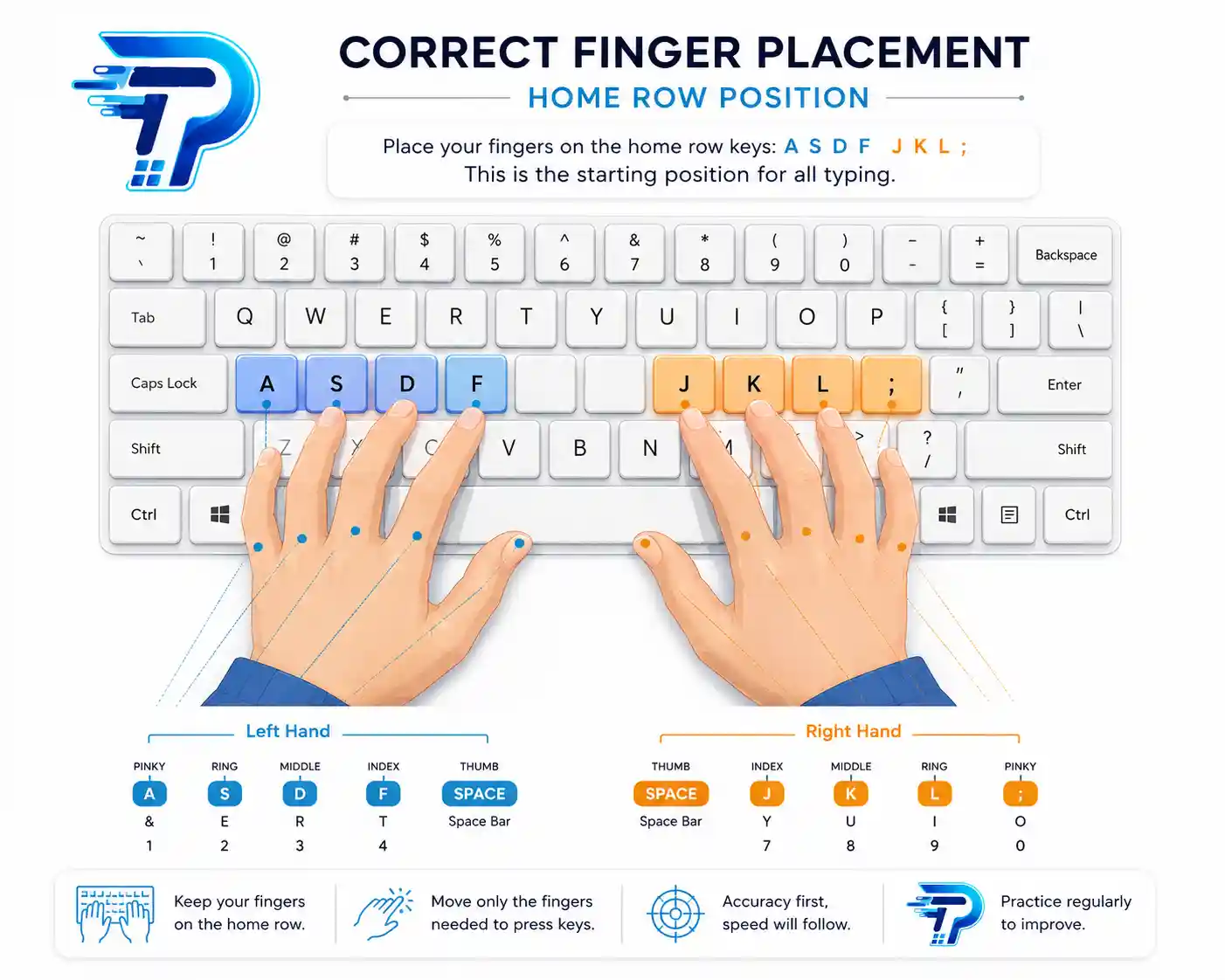
Most self-taught typists never learned the home row technique (ASDF JKL;), which is the foundation of fast, accurate typing.
2. You're Still Looking at the Keyboard
Looking down breaks your rhythm and slows your brain-to-finger connection. Every glance costs you valuable milliseconds.
3. You're Using the Wrong Fingers for Certain Keys
Using your index finger for every key (or "hunting and pecking") dramatically limits your speed ceiling.
4. You Haven't Built Muscle Memory Yet
Speed comes from repetition. Without consistent daily practice, your fingers never learn the automatic patterns needed for fast typing.
5. You're Tense While Typing
Stiff wrists, hunched shoulders, and tight fingers slow down movement and increase fatigue.
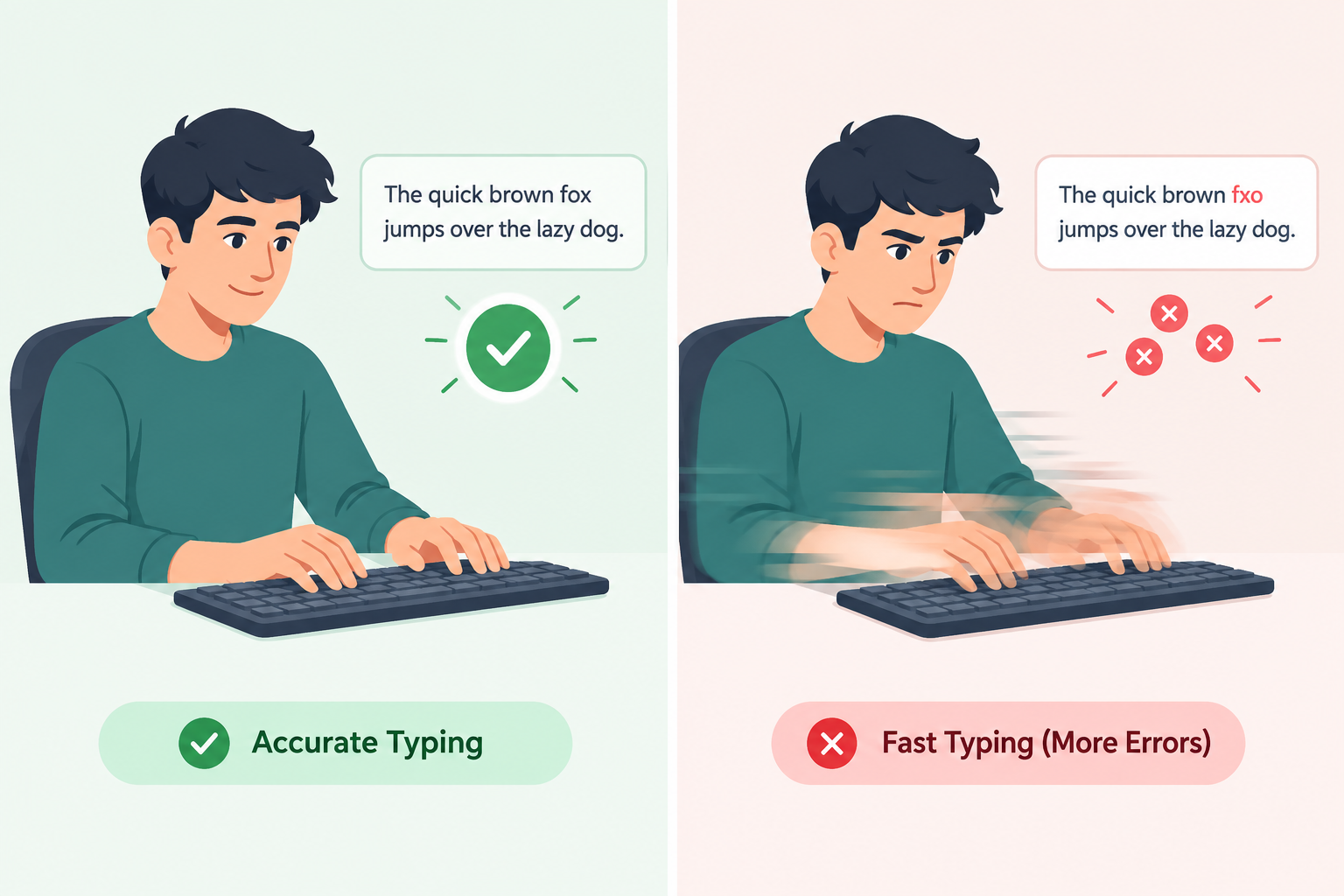
6. You're Focused on Speed Instead of Accuracy
Ironically, trying to type fast too early causes more mistakes, which then slows you down even more.
7. You Don't Practice With Structure
Random typing (like chatting or emailing) doesn't build speed the way structured practice does.

Why Do I Make So Many Typing Mistakes?
Typing errors usually come down to a mismatch between speed and skill level. Here's what's really happening:
- Your brain is ahead of your fingers — you're thinking faster than your hands can physically move.
- Weak finger-to-key mapping — your fingers haven't memorized exact key locations yet.
- Fatigue — tired fingers lose precision, especially during long typing sessions.
- Poor posture — an uncomfortable position affects hand control and accuracy.
- Lack of rhythm — inconsistent typing speed causes fingers to "misfire."
The fix isn't typing faster — it's typing smarter, with proper technique that naturally reduces errors over time.
The Science Behind Typing Difficulty
Typing is what scientists call a fine motor skill, similar to playing a musical instrument. It requires:
- Visual processing (reading the text)
- Cognitive processing (converting words into keystrokes)
- Motor control (finger movement)
- Feedback loops (correcting mistakes in real time)
Research on skill acquisition shows that motor skills like typing improve through a process called myelination — your brain builds stronger neural pathways every time you repeat an action correctly. This is why consistent, correct practice matters far more than occasional, fast typing.
How Muscle Memory Changes Everything
Muscle memory is the secret behind every fast typist you've ever seen. It's the reason professional typists can type 80+ WPM while carrying on a conversation, barely glancing at the screen.
Here's how it works:
- You repeat a specific finger movement correctly.
- Your brain creates a neural shortcut for that movement.
- Over time, the movement becomes automatic — no conscious thought required.
This is exactly why beginners struggle: they haven't built these shortcuts yet. But with consistent practice (even just 15–20 minutes a day), muscle memory develops surprisingly fast.
Common Mistakes Beginners Make
- Typing with only 2–4 fingers instead of all 10
- Constantly looking down at the keyboard
- Practicing inconsistently (once a week instead of daily)
- Ignoring proper posture and hand position
- Focusing on speed before building accuracy
- Skipping foundational home row practice
- Getting frustrated and quitting too early
Step-by-Step Solution: How to Make Typing Easier
Step 1: Master the Home Row Position
Place your fingers on ASDF (left hand) and JKL; (right hand). This is your "home base" for every keystroke.
Step 2: Practice Without Looking
Cover your hands with a cloth or simply train yourself to keep your eyes on the screen, not the keyboard.
Step 3: Slow Down First
Focus on 100% accuracy at a slower pace. Speed will naturally follow once accuracy becomes automatic.
Step 4: Use Structured Typing Lessons
Random practice builds bad habits. Structured lessons (like the ones on TypingPractices.com) target specific finger and key combinations.
Step 5: Practice Daily, Even in Short Bursts
15–20 minutes of focused daily practice beats a rushed 2-hour session once a week.
Step 6: Track Your Progress
Use a typing test to measure your WPM and accuracy weekly. Progress tracking keeps you motivated.
Step 7: Fix Posture and Hand Position
Keep wrists straight, shoulders relaxed, and screen at eye level to reduce fatigue and improve control.
Best Daily Typing Practice Routine
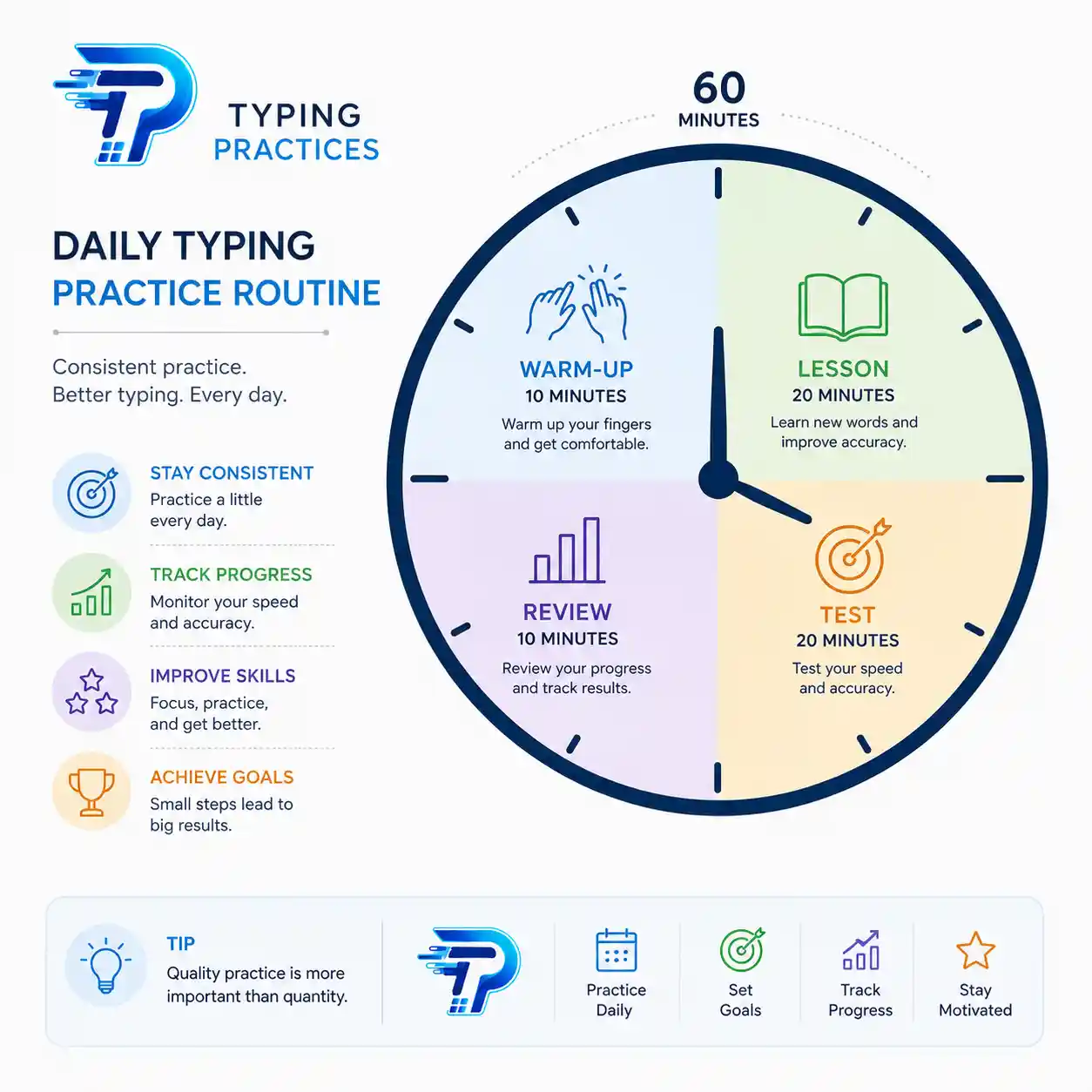
| Time | Activity |
|---|---|
| 5 minutes | Warm-up with home row drills |
| 10 minutes | Structured lesson (specific key patterns) |
| 10 minutes | Typing test for speed and accuracy |
| 5 minutes | Review mistakes and repeat weak areas |
Following this simple 30-minute routine consistently for 2–3 weeks can significantly improve both speed and accuracy.
Tools and Techniques That Actually Work
- Structured typing lesson platforms (like TypingPractices.com) that guide you finger-by-finger
- Typing tests to track WPM and accuracy over time
- Keyboard heat maps to visualize which keys you struggle with most
- Daily practice streaks to build consistency
- Posture correction tools like wrist rests and ergonomic keyboards
How Long Until Typing Feels Easy?
Most beginners notice a real difference within 2–3 weeks of consistent daily practice. Full touch-typing fluency (where typing feels automatic) typically takes 4–8 weeks, depending on practice frequency and prior typing habits.
The key isn't talent — it's consistency. Typing is a trainable skill, just like riding a bike or playing an instrument.

Final Thoughts
Typing feels hard because most people never learned the right technique — not because they lack the ability to type fast. Once you understand the real reasons behind slow typing and frequent mistakes, fixing them becomes a matter of structured practice, not natural talent.
Start with proper finger placement, slow down to build accuracy, and practice consistently every day. Within a few weeks, what once felt frustrating will start to feel effortless.
Ready to fix your typing for good? Start practicing with structured, beginner-friendly lessons at TypingPractices.com today.
FAQs
Q1: Why is typing so hard for beginners? Because typing requires new neural pathways and finger coordination that most people never formally learn.
Q2: Why can't I type fast even after years of typing? Years of typing with incorrect technique (like using only a few fingers) can cap your speed regardless of experience.
Q3: Why do I make typing mistakes even when I know the words? Mistakes usually come from your fingers not matching your brain's speed — a sign you need more accuracy-focused practice.
Q4: Can adults improve their typing speed? Yes. Typing is a trainable motor skill at any age with consistent practice.
Q5: How can I stop looking at the keyboard while typing? Practice home row drills daily and resist the urge to look down, even if it slows you initially.